Features
Everything it does, and what it costs you to run
GameHydra is a tray application that manages where your games physically live. It is not a launcher, not a cleaner, and not something you interact with daily.
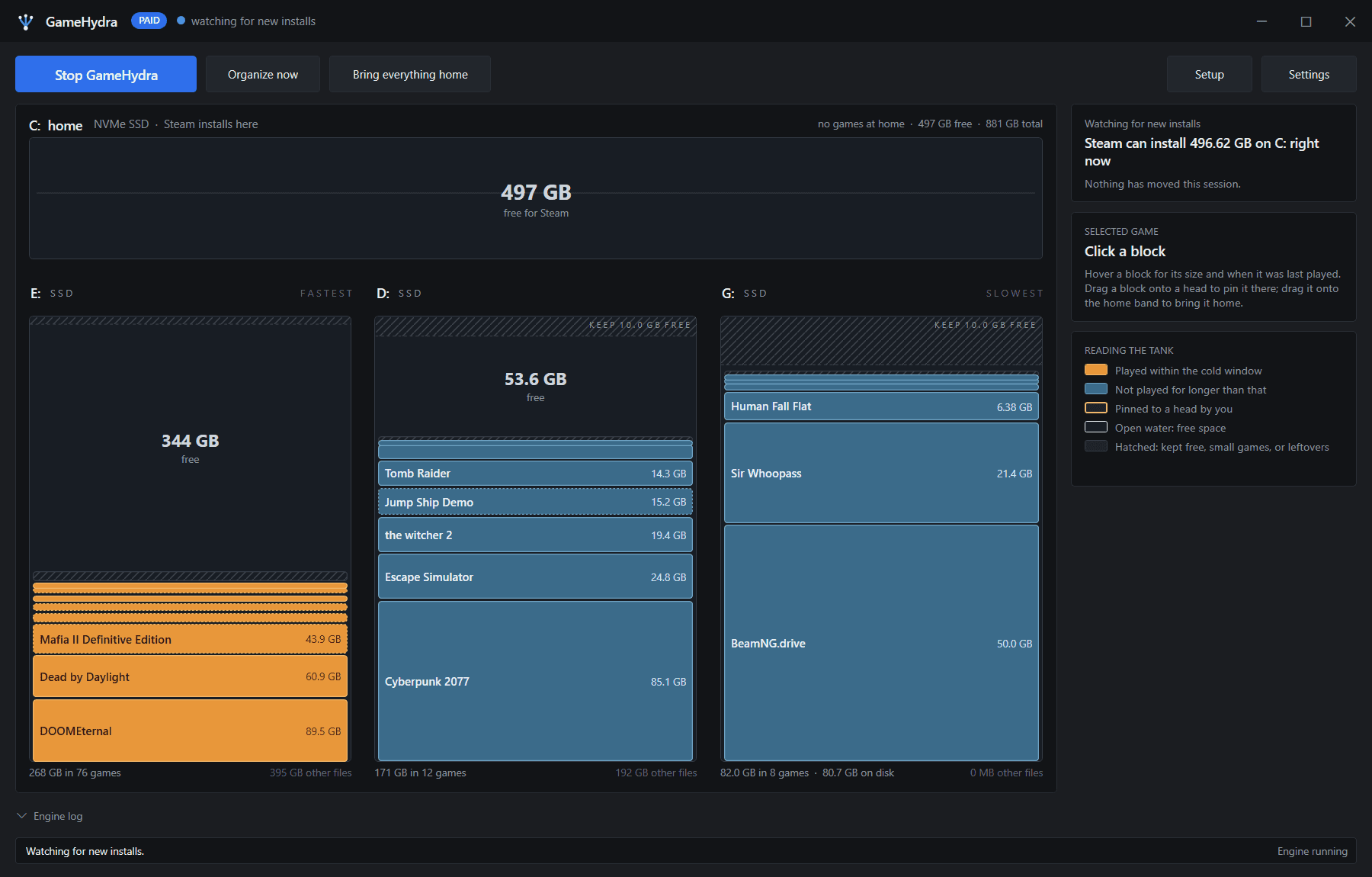
- Played in the last 30 days
- Not played in the last 30 days
- Pinned to a drive
- Free space
Scope
What GameHydra is not
Being clear about this saves you a download.
Not a launcher
You still launch games from your launcher. GameHydra has no game list you play from and no overlay.
Not a disk cleaner
It does not delete anything, find junk files, or reclaim space by removing data. It moves whole games and leaves them intact.
Not a backup tool
A moved game exists in one place, on one drive. Compression saves space; it is not a second copy.
Launcher support
Five launchers, sorted together.
Steam, Epic Games, GOG Galaxy, EA app and Ubisoft Connect are all sorted on the same drives by the same rules.
- Steamsupported
- Epic Gamessupported
- GOG Galaxysupported
- EA appsupported
- Ubisoft Connectsupported
What it does
Everything it does for your libraries
The list below assumes a supported launcher, one or more NTFS drives, and that you want the sorting to happen without being asked.
- The engineStandard
Games sort themselves
Steam downloads move off the install drive as they finish; games from your other launchers move the next time GameHydra organizes.
GameHydra watches your Steam libraries, so when a Steam download finishes the game is moved to the right drive and a junction is left behind. Games from Epic Games, GOG Galaxy, EA app and Ubisoft Connect are sorted the next time GameHydra organizes: when it starts, and in a background pass while the PC is idle, at most once a day by default. You do not open the app, and you do not pick a destination. On the free plan the same sorting runs when you click Organize now.
- The drives
Fast drives for what you play
Recently played games sit on your fastest included drive. Games you have not played for a while move to the slowest.
You tell GameHydra which drives it may use and how fast each one is. Games you have played recently stay on the quickest drive with room for them. Games you have not opened in a while move down to slower storage. A game is only ever moved whole — never split across drives, never partially copied.
- The blocks
Your launcher never notices
An NTFS junction stays where the game was, so the path your launcher recorded still resolves.
The game folder moves; a junction takes its place at the original path. Windows resolves it below the file-system API, so the launcher and the game itself both read the old path and get the new location. Launching works. Updates work. Uninstalling from your launcher works. Verifying game files works.
- The blocksStandard
Compression for games you are not playing
Games you have not played in a while are compressed in place, and decompressed when you launch them.
Games you have not played recently can be compressed with LZX, the compression built into Windows. The game stays where it is and stays playable — Windows decompresses on read. GameHydra fully decompresses a game the moment you launch it again, so there is no first-run penalty after the initial restore.
- The engine
Runs in the tray
Starts with Windows and stays out of the way. There is no daily interaction.
GameHydra sits in the system tray and starts with Windows. Day to day you do not open it. When you do, it shows which drive every game is on, how much space each drive has, and what it plans to move next.
- The engine
Never moves a game you are using
A game that is running, or that its launcher is still installing or updating, is never moved.
Before a move starts, GameHydra checks that the game is not running and that its launcher is not installing or updating it, and leaves it alone if either is true. Background sorting also waits while Steam is downloading or updating, for a few minutes after you use GameHydra, and while a laptop is on battery. Moves are whole-game, so an interrupted move leaves the game where it started rather than half-copied.
- The blocks
One-click undo
Bring everything home restores every game to its own drive and removes every junction.
One action moves every game back where the launcher originally put it and removes the junctions. Uninstalling GameHydra does not do this for you, and nothing breaks if you skip it: a moved game keeps working without the app. If you want every game back on its install drive, press Bring everything home before you uninstall.
- The blocksStandard
Override it when you want to
Drag a game onto a drive to pin it there, and the sorter leaves it alone.
The automatic placement is a default, not a rule. Drag a game block onto a drive to pin it there and it stays put regardless of how long since you played it. Drag it onto your home drive to bring that one game back to its install drive. Pinned games are outlined so you can see at a glance what you have overridden.
- The drives
Leaves room on every drive
Each drive keeps a reserve free, so a drive never fills to the point of causing problems.
You set an amount to keep free on each included drive — 10 GB by default. GameHydra treats that as unavailable and will not pack a game into it. Small games and leftovers are shown against the same reserve, so what you see as free space really is free.
- The drivesStandard
As many drives as you have
Add every HDD and secondary SSD in the machine. GameHydra fills them in order.
Include any drive you want used, and set its speed. The free plan manages one included drive; Standard removes that limit. Drives can be excluded at any time, and excluding one moves its games elsewhere rather than stranding them.
Requirements
What it needs
The NTFS requirement is not a preference. Junctions are an NTFS feature, so a non-NTFS drive cannot be a destination.
- Operating system
- Windows 10 or 11, 64-bit
- File system
- NTFS on both the source and destination drives
- Permissions
- Administrator only to move games into or out of protected folders such as Program Files
- Storage
- One or more additional internal or external drives
- Launchers
- Steam, Epic Games, GOG Galaxy, EA app and Ubisoft Connect.
- Junctions are an NTFS feature. Both the drive a launcher installs to and the drive a game moves to must be NTFS. exFAT and FAT32 drives cannot be used as destinations.
- Network drives and mapped network locations are not supported. Junctions do not resolve reliably across them.
Stop uninstalling games to make room.
The free plan manages one launcher across one extra drive. If it earns its place, Standard is $29, once.